Last Updated on December 5, 2025 by Luxe
The action camera is an ideal tool for recording travel, outdoor activities, sports, and daily life. It is compact, portable, waterproof, and shock-resistant, allowing you to capture amazing moments in any weather or environment. However, beginners often struggle to shoot ideal footage. Common issues include blurred images, unstable lighting, unclear audio, and monotonous composition. This article summarizes the common mistakes beginners make, explains specific solutions, and demonstrates how to utilize the latest features.
Causes and Solutions for Camera Shake and Blur
The most frequent problem with アクションカメラ is camera shake. When shooting handheld, while walking, or cycling, vibrations are easily reflected in the footage. Beginners, in particular, often support the camera only with arm strength, causing subtle movements to accumulate and appear as blur in the video.
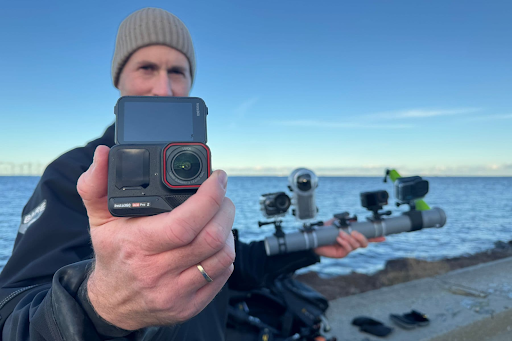
Solution: First, it is crucial to maximize the use of the stabilization function. Recently, AI-powered Electronic Image Stabilization (EIS) has advanced, with models like the Insta360 Ace Pro 2 capable of delivering smooth video even while walking or riding. Models equipped with Optical Image Stabilization (OIS) can achieve more natural and stable motion.
Furthermore, utilizing accessories like tripods or grips is effective. Fixing the camera to a bicycle handlebar or a chest mount significantly reduces shake compared to handheld shooting. When performing pans or tilts while moving, you need to be conscious of absorbing shake with your whole body, not just your arms. When shooting a horizontal pan while walking, minimizing movement in your shoulders and hips to stabilize the camera greatly improves the smoothness of the footage.
Exposure and Brightness Adjustment Errors
A common mistake for beginners is unnatural light balance. The sky might be overexposed (white-blown) in bright sun, or the scene might be too dark indoors or in a tunnel. Especially in high-contrast scenes, if the exposure is fixed, highlights and shadows are easily crushed.
Solution: Utilizing Exposure Compensation and HDR shooting is effective. The latest models feature automatic HDR and HDR video shooting capabilities that can equalize the difference between light and dark areas. Additionally, using ND filters or variable filters can help achieve smooth footage even in bright daylight. Being mindful of the ambient light and adjusting settings before shooting is the secret to getting stable footage, even for beginners.
Some models also allow manual adjustment of ISO and Shutter Speed. By using low ISO to suppress noise and changing the shutter speed according to the situation, the image quality can be significantly improved. It is good practice to change settings for different scenes, such as outdoors, indoors, and night views.
Lack of Understanding of Focus and Depth of Field
Action cameras often have small sensors and may struggle with focusing. Subjects at close range or moving targets can be particularly difficult to focus on. Relying only on auto-focus can lead to blurred subjects.
Solution: It is important to check the types of Autofocus (AF) modes. Continuous AF is suitable for moving subjects, while Single AF is better for still objects. Manually locking the focus (“Manual Focus Lock”) is also useful. The Insta360 Ace Pro 2 has a subject tracking function, making it easier for beginners to maintain focus automatically. Switching settings based on distance and movement can reduce failure.
Being aware of the depth of field is also important. Wide-angle lenses tend to keep the entire scene in focus, but if you want to blur the background, choosing a model with variable focal length is effective.
Audio Recording Issues
Audio is an aspect that is often overlooked. Wind noise, driving sounds, and surrounding ambient noise can detract from the impact of the video. Clear audio is essential, especially for travel vlogs and live commentary videos.
Solution: Using a wind muff or external microphone is effective. Also, many modern action cameras include a “Wind Noise Reduction” feature, allowing beginners to record clearer audio. Another option is to perform noise reduction using an app after shooting. For example, the Insta360 Ace Pro 2 allows automatic noise reduction within its built-in app, offering some correction even when the recording environment is poor.
Battery and Overheating Management
Sudden camera shutdowns during long shooting sessions are caused by battery depletion or overheating. Power consumption increases, especially when shooting in high-resolution or high-frame-rate modes.
Beginners should prepare spare batteries and feel secure knowing they can use a mobile battery for charging if needed. Since overheating is prone to cause recording stops in direct sunlight, it is important to take breaks to let the camera cool down. Recent models also have temperature sensors and features that notify the user before overheating occurs. Understanding these features and planning your shooting schedule in advance can reduce issues during filming.
Avoiding Mistakes in Shooting Angle and Composition
Beginners often struggle with angles and composition. While a wide-angle lens can capture dynamic footage, the subject can appear far away and small.
Solution: It is important to change the angle based on the shooting purpose. Choose a wide-angle for focusing on the scenery, and a near-standard field of view if you want the subject to stand out. Also, use the leveling function to ensure the footage is stable and level. The Insta360 Ace Pro 2 features automatic horizon leveling, which prevents the screen from tilting even when shooting handheld, making it easy for beginners to use with confidence.
Achieving Pro-Level Results with Editing and Apps
Post-shooting editing significantly influences the final quality. Modern action cameras allow for automatic editing via smartphone apps or PC software. For example, the Insta360 app uses AI to perform stabilization and trimming simultaneously, generating smooth videos in a short time. Adding BGM and text is also easy, allowing beginners to aim for professional-level results.
By mastering not only shooting but also editing, you can minimize mistakes and consistently create stable footage. Being mindful of video length and scene transitions will help you create videos that are easy to watch.
How Beginners Can Shoot Stable Footage with an Action Camera
The reasons why action camera beginners struggle to shoot well are diverse, including camera shake, exposure, focus, audio, battery, and composition. However, these issues can be improved by understanding the problems and taking countermeasures in advance.
The latest models are equipped with easy-to-use features for beginners, such as AI stabilization, low-light correction, wind noise reduction, and automatic horizon leveling. The Insta360 Ace Pro 2 is a prime example, with high user ratings. The key is to understand your camera’s features before shooting and optimize settings according to the environment and purpose. By not being afraid of mistakes and gaining experience, you will be able to shoot stable, high-quality footage.